Pages

Thursday, 1 November 2012

Command line Way to Super Hide Files and Folders in Windows 7/Vista/xp

Federated Mart - Find Everything

https://federatedmart.com/
Your one stop to find products and prices on the web.

Command line  Way to Super Hide Files and Folders in Windows 7/Vista/xp


It seems like people just can’t get enough of how to create hidden folders or locked folders, etc in Windows. I’ve already written two guides on how to hide a folder, one using a very simple built-in feature of Windows and another by using some Windows scripts. In the latter article, I also mentioned a free program that you can use called Folder Hide to completely remove a folder from visibility.

But there’s yet ANOTHER way you can hide a files and folders which is similar to the first post I mentioned above, but is definitely way more secure. It actually involves using the command prompt and a built-in Windows function to change certain attributes of a file or folder. Once the attributes have been changed, the files cannot be seen by the system.

The reason I like this method is because it does not involve any third part software (if someone sees FOLDER HIDE, they might ask you what exactly you’re trying to hide from them) and it’s not as simplistic as the first method I wrote about where you simply change the properties of the file or folder to hidden and anyone can easily un-hide the folder by configuring the Windows Explorer setting to “Show Hidden Files and Folders”.

Here’s how you can create a hidden folder in Windows for free that’s pretty secure:

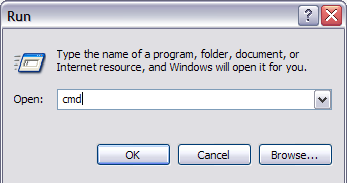
1. Go to Start, Run and then type in CMD to open the command prompt window


2. Now navigate to the parent folder of the folder you want to hide. If you want to hide a file, navigate to the folder where the file is located. For example, I want to hide a file in C:\Test, so I would type in the following:

CD C:\Test


3. Now type in the following command, replacing the word filename with the name of the file you want to hide.

attrib filename +s +h

And that’s it! Your file or folder is now completely hidden! It won’t show up in My Computer, it won’t show up if you browse via the command prompt and it won’t even show up if you select “Show all Hidden Files and Folders”.

If you want to un-hide the folder you simple follow the same steps, expect now you’ll run this command:

attrib filename -s -h

You can use this command for both files and for folders. In our example, if I wanted to hide C:\Test, I would go one level above to C:\ and then type in attrib Test +s +h.


You’ll definitely need to remember which folders or files you have hidden as there is no easy way of determining what’s missing, so make sure you remember what you hide!

So now you have three ways to make a folder or file in Windows XP invisible! Any questions, post a comment! Enjoy!

Monday, 29 October 2012

Manufacturing technology-II assignment for ME-VA

Federated Mart - Find Everything

https://federatedmart.com/
Your one stop to find products and prices on the web.
Manufacturing technology-II Assignment
ME-VA

Note: Last date for submission is 23/11/2012


  1. Give the nomenclature of lathe and milling machine tool with neat sketch.
  2. Explain briefly orthogonal and oblique cutting also differentiate them.

  1.  By merchant force circle prove that   ɸ = π/4 - 1/2(β-α).Also find the expression for  tan ɸ

  1. Write short note on temperature distribution at chip tool interface.

  1. For selection of tool material what properties of material should be considered?

  1. Write short note on various cutting tool material.

  1. Write short note with neat and suitable sketch-
1.       Types of tool wear
2.       Wear mechanism for tool
3.       Factors responsible for tool life.

  1. What  are the basic purposes for using cutting fluids.
  2. Write short note on
1.       Types of cutting fluid
2.       Action of cutting fluid
3.       Effect of cutting fluid on cutting tool
4.       Selection criteria for cutting fluid
  1. Along with application, advantages, disadvantages and process parameters explain the principle of working of following machining processes:
1.       Abrasive jet machining(AJM)
2.       Electro Chemical Machining(ECM)
3.       Electro chemical grinding(ECG)
4.       Electric Discharge machining(EDM)
5.       Electron Beam Machining(EBM)
6.       Laser Beam Machining(LBM)
  1. Write short note on
1.       Selection and classification of electrolyte for ECM
2.       Dielectric and tool material selection for EDM
  1. Write short note on :
1.       Locating devices
2.       Clamping devices
3.       Drilling jig
4.       Milling jig
5.       Jigs and fixture
6.       Location principle
  1. Explain briefly
1.       Development stages /growth of NC
2.       Axes of NC machines
3.       Classification of NC system
4.       Machine Control Unit (MCU)
5.       Tool changer in NC  Machine tool
6.       NC DNC and CNC and Advantages of each.
  1. Explain manual part programming also mention commonly used G an M codes.
  2. Write program for
1.       Two axis turning operation  and
2.        two axis milling operation
  1. Write short note on –
1.       Group technology
2.       Part coding and classification
3.       Production flow analysis
4.       Steps for implementation/ adoption  of group technology
5.       Advantages for group technology
6.       Mono-code and poly-code system for part coding.
  1. What is the effect of speed, feed rate and depth of cut on surface finish
  2. What are the types of chips produced in machining and reason /factors responsible for them

Monday, 22 October 2012

INTRODUCTION TO MANUFACTURING SYSTEMS BME


Manufacturing System Definition:

A collection of integrated equipment & human resources, whose function is to perform one or more processing and/or assembly operations on a starting raw materials, part, or set of parts.

 Components of a Manufacturing System

1.       Production Machines
2.       Material Handling System
3.       Computer Control System
4.       Human Resources

A Classification Scheme for Manufacturing Systems

1.       Type of Operations Performed
2.       Numbers of Workstations
3.       System Layout
4.       Automation & Manning Levels

Manufacturing  Equipment includes:

1.       Production machines and tools
2.       Material handling and
3.       work positioning devices  
4.       Computer systems
5.       Human resources: are required either full-time or periodically to keep the system running.

A manufacturing system consists of several components:

1. Production machines plus tools, fixtures & other
related hardware
2. Material handling system
3. Computer systems to coordinate and/or control the
above components
4. Human workers.

Machines can be classified as:

Manually operated: control or supervised by a human worker.
i.e. lathes, milling machines, drill presses
Semi-automated: performs a portion of the work cycle under some from of program control, and human worker tends to the machine for the remainder of the cycle, by loading and unloading it or performing.
 i.e. CNC lathe controlled.
 Fully automated.: operates for extended periods of time with no human attention.
i.e. injection molding machines.

Material Handling System

The following material handling functions must be provided:
1. Loading work units at each station
2. Positioning the work units at each station
3. Unloading work units at each station
4. Transportation of work units between station in multi-station manufacturing systems

Thursday, 11 October 2012

THERMAL POWER PLANT

Federated Mart - Find Everything

https://federatedmart.com/
Your one stop to find products and prices on the web.


Binod Kumar Singh
Associate Professor & Head,
Department of Mechanical Engineering
Rawal Institute of Engineering & Technology,
Sohna Road,Near Vill. Zakopur,
Tahsil Ballabhgarh,Distt. Faridabad
HARYANA

Email: singh_binod_kumar@yahoo.com

RTI Format for PF account statement

Federated Mart - Find Everything


https://federatedmart.com/
Your one stop to find products and prices on the web.


THE RIGHT TO INFORMATION ACT 2005
APPLICATION FOR OBTAINING INFORMATION

By Speed post AD
To,
CENTRAL PUBLIC INFORMATION OFFICER
OFFICE OF PROVIDENT FUND COMMISSIONER,
EMPLOYEES PROVIDENT FUND ORGANISATION,
SHRI R.K PAL, RPFC II
BHAVISHYA NIDHI BHAWAN, PLOT NO 43, SECTOR 44,
GURGAON - 122 002 .

1. Name of the Applicant:     
PF a/c No.                              

2. Full Address:                     


3. Particulars of information required
A.    Please let me know present status of my application for withdrawal benefit certificate.
B.     Please supply me ledger extract/ account summery and balance of my PF a/c _________________ including interests and balance, duly certified by you or the competent authority.
C.     I be informed details of action so far taken by your office on my application. If no action is taken, I should be informed reasons thereof and names, designation and place of present posting of officers responsible for the same.
D.    Please inform me period prescribed by your office for full settlement of P.F. dues of the employee and action prescribed for not settling claim in prescribed time limit.

4. I enclose herewith Indian Postal Order No.__________________ dated__________for Rs.10/- in favor of  Accounts Officer, EPFO  Gurgaon” as application fee.

5. Information sought by me is required by post. Kindly rush the same. I am an Indian citizen.

6. I be intimated details of First Appellate Authority under RTI Act  2005 with detailed postal  address.


Date:_____________                                                                                     Applicant’s Signature